Sandhills WordPress Sites.
Sandhills has created our own unique CMS editor to lay over the top of WordPress. The goal is to give our customers an easy to use way to edit their own websites. However, we also engineered the editor to make it quicker and easier for designers to build websites.
We have striven to build a flexible platform that can continue to be upgraded and expanded to give our designers and customers an unprecedented level of features and control over their Sandhills website. We will continue to add features as we go. If you have ideas for useful features, let us know!
If you do need any info on how WordPress works or just want to learn more, use the following link:
https://developer.wordpress.org
WordPress, Widgets, and the Editor.
There are three distinct pieces that make up a Sandhills WordPress site.
-
WordPress
-
Sections & Widgets
- The Editor
WordPress
WordPress is the foundation that everything is built on. It is what ties all the pieces together. It combines the Theme files you will edit with the information stored in the database to create the website itself.
WordPress uses logic and loops to create the rules it uses to serve the correct page, with the correct content, organized with the correct structure and the correct styling every time a page is requested by a browser. Every single page is made up of dozens, if not hundreds, of tiny files. WordPress' main function is keeping track of these files and organizing them all to create the beautiful website the user sees.
WordPress Themes
Themes create the unified look and feel of a WordPress site. WordPress Themes are the most basic building block that creates your site's structure. These themes are created from the files in the Themes folder. Once the theme is set up it seldom needs to be modified. All new content will respond to the rules established in the theme.Your theme will either be based on one of our Sandhills Templates, or you will have a custom theme built to your own specifications for you by your own Sandhills Designer.
WordPress Plugins
Plugins are additional files that can be installed to extend the built-in functionality of WordPress. We have built many custom Plugins, including the Editor, to extend WordPress and make it automatically integrate with the Sandhills Cloud inventory and auction listings.While exceptions can be made, we generally try to avoid using third party plugins as they can create security vulnerabilities for hackers to exploit. Most WordPress hacks are due to insecure third party plugins.
Our Sandhills Widgets are designed to offer the functionality you would normally get from different plug-ins, but in a unified environment that works as a seamless whole. If you see a need for a new Sandhills Widget, just ask! We are always looking for good ideas to expand the platform.
Sections & Widgets
We use Sections (aka Layout Areas) and Widgets to give each page its structure and add its content, but also to make sure that it is mobile-responsive. Sections and Widgets are so intertwined, that it is difficult to explain one without the other.
Widgets contain the content on a web page.
Widgets are the containers for webpage content. Having different stand-alone Widgets allows us to create distinct areas on a page that can have very specialized content and functionality. This specialization also means we can create easy-to-use interfaces for complex tasks that our customers would not otherwise be able to manage themselves.The main widget you will use adds an editable area to pages that can be edited discretely from any other part of the site. These areas hold the text, photos, video, and graphics that make up the majority each website. For example, this content is written in an editable widget. Other widgets allow us to add contact forms, slideshows, photo galleries, and even content from other plugins.
Think of Sections as Widget containers.
Sections allow us to organize and arrange Widgets on each individual page. You cannot add a Widget to a page without a Section.You create the grid that your page is made from with Sections . You can have as many as you need on each page. You can have as many Widgets as you like within a single Section. You cannot add a Widget to a page without a Section.
Sections are important because they give designers the flexibility to use different grid structures on different sections of a single webpage. You may need a full width widget in one area, three columns of widgets in another, and two mismatched widgets in a third area. The Sections allow you to create a grid that you will add widgets to which create the content on the page.
We generally recommend keeping the Sections to the minimum needed to create your page structure and adding multiple Widgets to them. Most pages will only need one or two Sections . However, that is only a rough guideline and you are free to use them in any way you like!
The Editor
The biggest difference between our editor and the built-in WordPress editor is that our editor allows customers to edit on the front of the site and see their changes as they will look once the page is saved. WordPress forces users to edit on the back end of the site, divorced from the templates and styles that will be rendered on the front end. The Sandhills Editor is a true WYSIWYG environment.
The Editor is the group of tools used to edit the content on a webpage.
Our system is designed to be easy enough for our anyone to use, but robust enough that you can still use it to create advanced layouts and beautiful websites. To that end most of the main editing functions are as visual as possible.
Text is easily edited and added to pages with the correct style already being rendered. Files and images are simple drag-and-drop operations. Images, videos and links can be easily inserted wherever the cursor is displayed. Preformatted styles and headings can be easily added to content with a couple clicks.
No system is perfect, but our customers find that the Sandhills Editor does a good job of making the complex task of editing a website a fairly easy process. We are always adding features and looking for way to ways to make the platform better, so please give us any suggestions you have for improvements!
Logging into WordPress is simple. Just add /wp-admin to the end of your primary domain and it will redirect you to the login screen.
For example: https://domain.com /wp-admin
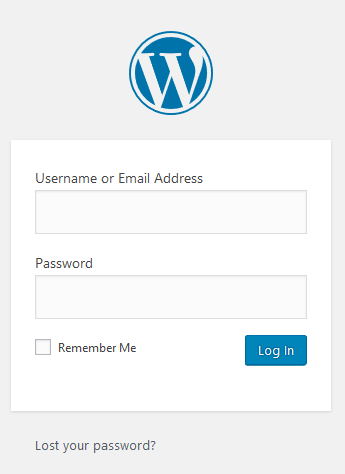
Your username will use the Sandhills first-lastname format.
The password will always use your Sandhills Cloud username and password.
We do not use usernames or passwords set up internally in WordPress. Even if you did manage to set one up in the back end of WordPress, it would not log you in.
If you need to add additional users to your WordPress site, contact your Sandhills sales rep. They will make sure the new user is set up in the Sandhills Cloud and give them proper rights to log into your website.
WordPress Basics
Pages vs. Posts in WordPress
You will primarily be working with Pages. Pages are ALWAYS singular and self-contained. Pages can have full the full editor, including widgets, and will always work well with the Sandhills CMS. Their content is tied to a specific URL and that won’t change.
Images are posts. Pages are a specialized kind of posts. So are Sidebars. Posts themselves c an have their own page, or be output with multiple other posts on a single page (like a blog). Custom Post Types are customized type of post that are populated by a ver y str uctured d at a set . Posts are every where.
Just remember that ONLY PAGES CAN HAVE WIDGETS added to them for dynamic content.
Sandhills Page vs. WordPress Page
This one is pretty simple. WordPress pages are basically standard pages that must be edited in the backend of WordPress. They do not have the added secret sauce that allows the editor to add Layout Regions or Widgets. They do work fine, but you will almost always use Sandhills pages.Sandhills editor vs. WordPress Editor
Sandhills CMS allows you to edit in a true WYSIWYG environment. You are truly editing on the page as you see it, in real time. The areas you edit are on the same pages, are the same size, are the same shape, and use the same style sheets as the saved page. The edits you make look exactly the same after you save the page. That’s what makes it so easy for customers to understand and use.WordPress pages can only be edited in the back of the site, saved, then viewed on the front to see what it looks like. It’s a very traditional and time-tested way of doing things. However, it’s a bit counter-intuitive for people who aren’t used to it and can be frustrating when the pages look different on the back and the front.
Sandhills Widgets vs. WordPress Widgets
If you have used WordPress before, you may be familiar with WordPress Widgets. WordPress widgets are basically standard widgets that must be edited in the back end of WordPress. They cannot be added to Sandhills Pages. If both exist on one page, you will encounter a myriad of JavaScript conflicts that will make your life very difficult.For this reason, we have disabled WordPress Widgets entirely. Virtually all of them have a counterpart in the Sandhills CMS that have more features, built in mobile responsiveness and are easier for our customers to edit.
When to use the Back-end WordPress vs. the Front-end Sandhills CMS.
You will use the front-end Sandhills CMS for almost all content entry. There are only a few main functions you do need to use the Back-end for on every page: setting up inventory, setting up Custom Post Types you may need and managing the menus.WordPress is a favorite platform the world over not because of its intuitive interface, but because of all the plugins it has. Unfortunately, plug-ins often create security holes, so you are not allowed to add any to a Sandhills WordPress site. Our Sandhills Widgets are designed to take the place of these plug-ins. If you see a need for a new Sandhills Widget, we are happy to build it for you. Just ask!